It’s no secret. I’ve had a love hate with tenkeyless keyboards for a long time (evidence here). I love the option of being able to type numbers without having to check the top of the keyboard. Maybe some of you just have it down and can type away, but I’m not as dextrose. I like my tenkey. Perhaps, that’s because I’m a gamer who works and doesn’t want two separate keyboards for work or play. On the other hand, the space saving of a tenkeyless can’t be beat. Nobody has been able to solve this dilemma for me. Until now. Well, almost. Turtle Beach recently cranked out the Command Series KB7 – a tenkeyless keyboard with a gorgeous touchscreen.
The look and feel:
It’s no secret. TB puts out some absolutely gorgeous (not to mention solid) looking products. The KB7 is no exception, and it’s arguably their prettiest keyboard yet. What makes it really stand out is the 4.3″ touchscreen just above the arrow keys. This is why I love it. It’s tenkeyless with the touchscreen option of a tenkey. That’s hardly what most people will likely use it for, but it’s there if you want it (more on this later). Basically, you can use it to switch keyboard setups, trigger custom commands, view things like system/game stats, and control certain apps without constantly opening software on your PC. The Swarm II software allows for tons of customization for your screen as well.
Beyond the touchscreen, Turtle Beach didn’t cut corners on construction. The KB7 has an aluminum top plate that gives it a brilliantly sturdy feel. Like other TB/Roccat products of the past, they include a soft detachable palm rest that adds comfort for longer gaming sessions (or unfortunately, work). This rest also illuminates nicely with the keyboard’s RGB lighting.
Turtle Beach continues to go with Hall Effect switches on their keys, meaning the keys use magnets instead of traditional mechanical contacts. The big benefit is that I can choose how far I have to press a key before it activates using the software (more on this below). Rapid Trigger lets the key reset almost immediately as I lift my finger, which makes movement feel faster in competitive games like Fortnite/Apex/pick your poison. Pair that with an 8K polling rate, and you’ve got a keyboard that can report your actions to your PC up to 8,000 times per second. That’s eight times more frequently than a typical 1,000 Hz gaming keyboard. Will you actually notice the difference? Maybe? Probably not, but it’s nice knowing the technology is there. Competitive gamers will take any edge they can get. Personally, I just like the “clicky” ness. Not too little…not too much.
TB includes Double shot PBT keycaps with textured WASD. This makes total sense right? Okay, let’s be honest, the average human isn’t going to understand what this means. I’m average. I had to look it up. Basically, letters on keys are “molded” into the keycaps so it would take a LONG time to wear them off. Also, the type of plastic used helps resist the shiny effect that overused keys tend to get. The WASD keys for shooters etc. have additional texture making it easier for me to find the movement keys by feel.
Real world use
Since we got this keyboard later than usual to review, I’ve been able to spend a little more than a month using it. This isn’t always something I get to do. I’ve used it every single day for both work and play (Stop rhyming now, I mean it – anyone?). This TKL does what it’s supposed to and then some. As mentioned above, it saves space. It takes up way less real estate on my desk, but that alone shouldn’t convince someone to pick it up. The on-the-fly adjustments, USB-A passthrough, dedicated action bar (press to mute wheel, media controls, and four mappable buttons on the top of the keyboard), editable macros/keys, and overall toughness should heavily influence your purchase too.
The horizontal space this puppy saves makes me feel like I actually have access to my mouse again. I’m not holding my arm 6 more inches to the right anymore and losing feeling in my fingertips. Again, I love this thing, and it makes me excited to see how they will improve it in the future. Gaming is still silky smooth and amazingly responsive. The keys hold up well while playing The Witcher 3: Remastered or the FPS of choice (mine’s still Apex). I can quickly find my place or highlight the keys I need as reminders.
Streamers get to rejoice with the KB7. The touchscreen integrates with OBS and Streamlabs, allowing gamers to manage their broadcasts without constantly jumping between windows. It’s kind of like having a mini Stream Deck built right into the keyboard. I’m not much of a streamer myself, but I can def see the appeal for those who are. Again, this is just another example of the versatility here.
One more feature I just have to point out is the ability to adjust actuation quickly without software. I just use the touchscreen to change the key sensitivity. This is awesome for gaming or typing. I can tweak the settings in a moment’s notice. I can even download new options for the touchscreen from Swarm. It’s quite easily one of the most customizable devices I’ve tested in years.
So close to perfection – and you need to know this
Here it is – the truth. The tenkeyless Command Series KB7 is ALMOST perfect. What bothers me is that there is a tenkey option in the touchscreen, but it’s missing key options. Mathematical symbols. So yeah, I can type numbers in, and this is helpful in a moment of need. I still have to move my hand to the math options on the full keyboard for formulas etc. I’d love to see the creativity TB can come up with to make this thing like a full blown tenkey in the future though the KB5 may be worth researching (we didn’t get a chance to review this one). I searched for other options on the Swarm software and didn’t find this option, but perhaps an update in the future will solve. Despite that – all is not lost.
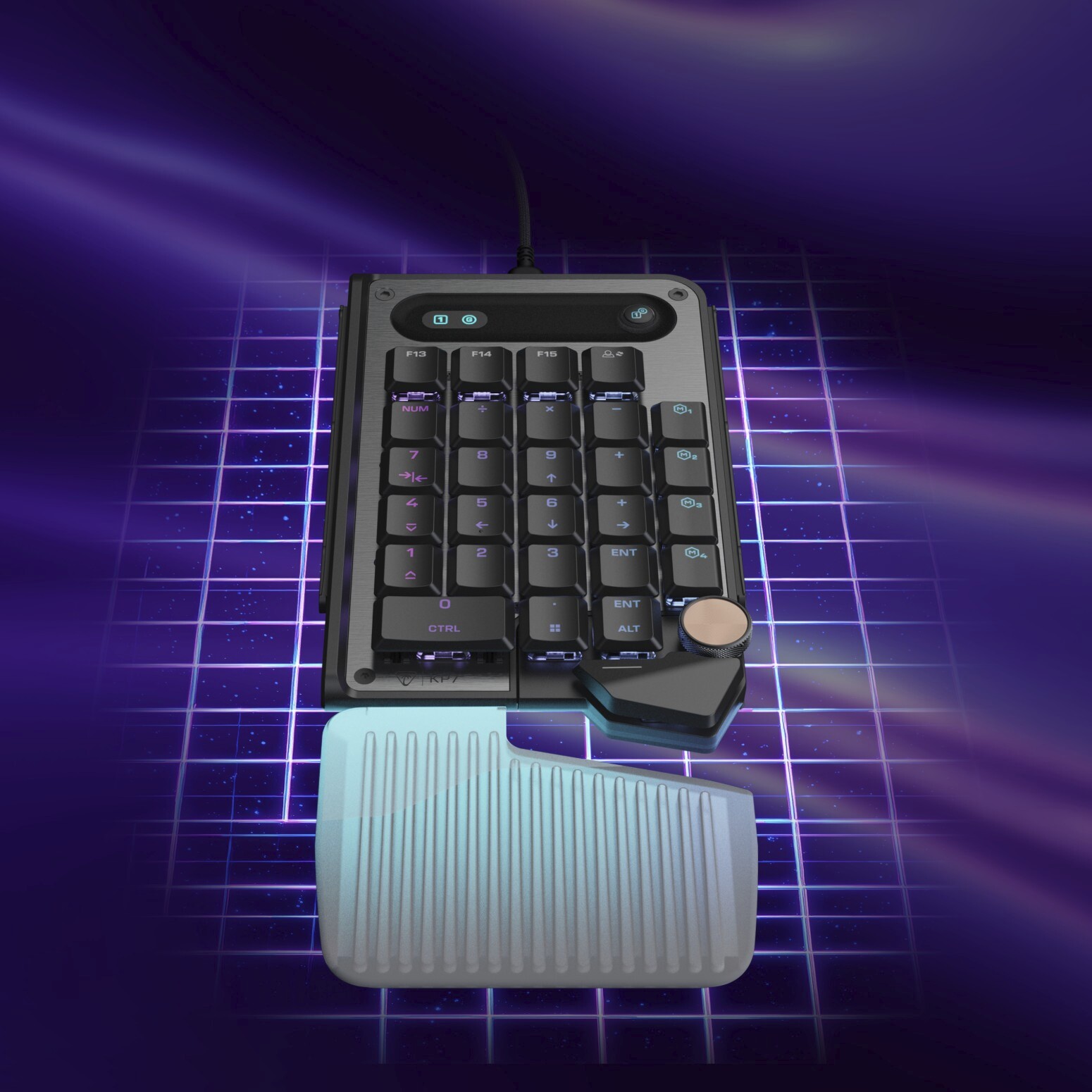
Turtle Beach actually solves for the tenkeyless problem for snobs. If you absolutely love the keyboard AND you want a full tenkey, you can add one to the keyboard. Sure, the screen might not have math symbols, but Turtle Beach included modular connection rails that allow additional Command Series accessories, including the KP7 keypad, to connect directly to the keyboard. For someone like me who struggles to give up a traditional tenkey, that’s in a word – awesome. I love the touchscreen, but having the option to add a physical number pad makes this keyboard even more appealing as long as you’re okay giving up the desk space. Having the option to choose is what makes this whole setup appealing.
Summing it up
The Turtle Beach Command Series KB7 is easily one of my favorite keyboards I’ve tested in a long time. It combines the desk-saving benefits of a tenkeyless design with an incredibly useful touchscreen that opens up a world of customization. The Hall Effect switches, adjustable actuation, responsive gaming performance, and durable build make it just as capable for work as it is for play. After more than a month of daily use, I’m genuinely impressed.
Is it perfect? Not quite. I’d love to see Turtle Beach expand the touchscreen’s tenkey functionality to include mathematical symbols, making it a true replacement for a dedicated number pad. Still, that’s a relatively small complaint for a keyboard that gets so much right. The KB7 has finally made me appreciate a tenkeyless keyboard without constantly feeling like I’m sacrificing something in return.